Social Icons

Monday, 13 May 2013

How To Install Windows 7 On MacBook Pro Using Boot Camp | Installation Guide Step By Step


Hello To All Friends Today i am going to show you how can you install windows 7 on Macbook Pro Using Boot Camp. First You Need To Some Requirements For Install Windows 
Requirements To Install Windows 7

1. Windows 7 can be installed on Mac OS X V 10.5 Leopard,V 10.6 Snow Leopard And Mac OS X v 10.7 Lion Which Has In Built Apple's Boot Camp With 3.1 Update.

2. ISO Image Of Windows 7 

3. At Lease You Have 16 GB Free Space For 32 Bit And 20 GB Free Space For 64 Bit Windows 7 On The Hard Disk. 

Now Follow Steps For Install Windows 7 On MacBook Pro Using Boot Camp

1. Now You From The Menu Bard , Navigate To GO -> Utilities


2. Now You Select Boot Camp Assistant From The Utilities Menu Bar.


3. Now Click On Continue Button


4. Now You Allocate The Size To Windows 7 (Atleast 20 GB For 64 Bit Or 16 GB For 32 Bit ) And Now You Click On  Partition Button.


5. Now You Insert Your Windows 7 DVD And Click On Start Installation Button.


6. Now You Need To Wait For Sometime . After Sometime You Will Prompt To Windows 7 Partition Window. From Here Select Boocamp Partition And Format The Drive Under The Advanced Drive Option.


7. Now You Click On Next Button

8. Now It's Will Take Some Time For Install Windows 7 On Your Own MacBook. Once It  Installed , Eject Windows 7 DVD.

9. Now You Insert Mac OS X Disc , Navigate To Boot Camp Folder And Click On Run Setup.exe

10.. Now You Boot Camp Installer Windows Will Be Open , Click On Next Button To Install Windows Drivers On Your  MacBook And Follow The Simple Instructions On The Screen.


11. After The Installation Of Your Drivers , Just Restart Your Computer To Effect Changes.

12. To Switch Between The Windows 7 And Max OS X , Hold The Option Key During The System Boot, Boot Menu Will Be Open You Can Select Your Desired OS To Boot.


That's It :) 

I Hope You Enjoy This Trick .  

Saturday, 11 May 2013

Election 2013, Pakistan Election 2013, Pakistan, Election Results 2013 Election 2013, Pakistan Election 2013

Polling time for Election 2013, arguably termed as one of the biggest elections in the country so far, is about to conclude. We are now left with just one hour before the conclusion of polling time, after which all attentions are going to get focused on Election results.

With extremely high turnout, the interest for Election is no doubt all time high. So is the curiosity for the results for the elections. Many of us would be looking for the real time Election updates and results for all the constituencies throughout Pakistan.
VIA HAMARI WEB

 LINK NO 1 TO VIEW ELECTION VOTING RESULTS


VIA GEO TV (The Great)

LINK NO 1 TO VIEW ELECTION VOTING RESULTS


Election 2013, Pakistan Election 2013, Pakistan, Election Results 2013  Election 2013, Pakistan Election 2013, Pakistan, Election Results 2013 Election 2013, Pakistan Election 2013, Pakistan, Election Results 2013 Election 2013, Pakistan Election 2013, Pakistan, Election Results 2013 Election 2013, Pakistan Election 2013, Pakistan, Election Results 2013 Election 2013, Pakistan Election 2013, Pakistan, Election Results 2013 Election 2013, Pakistan Election 2013, Pakistan, Election Results 2013 Election 2013, Pakistan Election 2013, Pakistan, Election Results 2013 Election 2013, Pakistan Election 2013, Pakistan, Election Results 2013 Election 2013, Pakistan Election 2013, Pakistan, Election Results 2013 Election 2013, Pakistan Election 2013, Pakistan, Election Results 2013 Election 2013, Pakistan Election 2013, Pakistan, Election Results 2013 Election 2013, Pakistan Election 2013, Pakistan, Election Results 2013 Election 2013, Pakistan Election 2013, Pakistan, Election Results 2013 Election 2013, Pakistan Election 2013, Pakistan, Election Results 2013 Election 2013, Pakistan Election 2013, Pakistan, Election Results 2013

Thursday, 18 April 2013

EARN MONEY FROM FACEBOOK and Twitter | Facebook Or Twitter Se Passay Kamayaa!

Fanslave ek asi Website ha jis ma ap ko dosray logo k facebook or Twitter k pages like krny hoty ha or like krny k bad mein ap ko credit milta ha, Facebook k ek page k like se ap ko 4 credit se 14 credits tak mill sakty ha.............(0.01Euro cent = 2credit) 

 Agr ap abhi SignUp Krty han to ap ko bonus ma 50 credits free milly gy. (0.01Euro cent = 2credit) 

Fansalve se ap earn kyaa howay cash se apnay pages bhi like krwa sakty ha.
Fanslave ma opption hoty ha jaha ap ko apnay page ka link day kr apnay pages like krwanay hoty  ha jiessy jiessy ap k pages log like krty rahay gy ap ko credit charge hota rahaya ga.

Or agr ap na earning krni ha to apnay earn kiyaa howay Euro Payza se Cash out bhi krwa sakty han
Apnay earn kiyaa howay Euro ko Cash out krwany k limit (15 Euro) ha Matlab jb ap k 15 euro ho jae gy tb ap cashout krwa sakty han

Payza ka account bnany k lyaa yaha click kary (payza jaha se ap cash out krwayaa gy)

fanslave ma ap Daily k 0.60 euro kama sakty han jo k monthly k 18 euro ho jae gy

(18euro=2250 rupess) is ka mtlb ha ap monthly  k 2250 rupay kama sakty han.

Lakin!!!  Ghabrayaa mat kyu k ap monthly 15000 se 20000 tak kama sakty han agr ap apna refererence bnana shorow kr day Matlab k ap k refference se jo log fanslave ma add hon gy un ki earning ka 15% ap ko mily ga  agr ap k sirf 20 refference bhi ho jae or wo daily work kry to ap montly 10,000 kama sakty han
Refference bnany k lyaa company ap k registered honay k bad ap ko reference link day gy us link se ap apny reference se member registered krwa sakty han
Note : Ap facebook ya twiiter k pages ko like krny k bad unlike bhi kr sakty han aisa krny per ap ki earning ma koi farq nai pary ga

Fanslave ma sign up krny k lyaa is banner pe click kray 


Banner per click krny k bad ek page open ho ga us page pe ("Join Now") ka button ho ga ap ko krna sirf yeh ha k us button pe click krna ha Or registration form open ho ga registration form ma apny information day or apna account bna le account bnany k bad apny account ma Sign In hon
us k bad ap ko apnay account ko FB se Connect krna ho ga connect krny k bad ap ko LEFT side pe facebook k pages  nazar ayaa gy un sab link ko click kray or like kry
Yeh sab krny k bad Jaha Credit likha howa ha us k nichay refresh ka button ho ga us pe click kry or ap k account ma Izzafa ho jae ga

Tuesday, 20 November 2012

How to Make icons background transparent in Windows XP

If you’ve been wondering why your XP desktop icons have a background color, you’ll be glad to know you can flip a checkbox and have them go back to a normal transparent background.
See the two below:
icons with backgroundicons without background
To set the transparent background on the icons, we’ll need to open System Properties in Control Panel (or right-click on My Computer and select Properties).
system properties 343
In this dialog, click the Advanced tab, and then the Settings button under the Performance section.
232
Now scroll down to the button where you’ll find a checkbox for “Use drop shadows for icon labels on the desktop”. Make sure you check this box if you want transparent backgrounds on the icons.
Why this option isn’t just labeled “Enable Transparent Icons On the Desktop”, I just can’t say.
if checking it doesn’t fix your problem there is another step you must do. Follow this procedure:
Control Panel > Display > Desktop > Customize Desktop > Web > Uncheck everything here > OK > Apply

Parents Connection With Child Facebook Account - Infographic

If you're parents of your children than you must aware of merits and demerits of having Facebook account and its usage from children’s. Most of the parents avoid to use Facebook because they don’t have much time to spend but their children’s do and many parents wants to keep an eye on their children’s Facebook account to track what their children’s are doing on Facebook. According to the latest research from lab42, 92 percent of parents are on Facebook to keep notice their children activities on Facebook and they are actually friends with their children.


The major reason behind usage of Facebook from parents is to connect with their children over the online social network is safety and securities. The research suggests that a marginally higher percentage of parents are worried that their children are bullying others on Facebook. 72 percent of parents know their child’s Facebook account and passwords, while 31 percent parents monitor their child accounts four or five times a week but most parents check their child’s Facebook activities on a daily basis.
Have a look at following Infographic from lab42 to know more about Parents Behavior, Reaction and Connection on their child's Facebook account.

Download and Install Android Apps Directly from Google+ Plus Post Stream


Android Apps from Google Plus

Google is now allowing its Android Smartphone, Tablet and Desktop device users to Download and Install Android Apps Directly from Google+ Plus Post Stream instead of visiting Google Play or Android Market for the installation of Android Applications. Whenever a Google+ Plus user (a Social Networking Website from Google) pasted a Google Play Application link as a new post or status into its Google+ Plus Stream, an 'Install' or 'Buy' Button will be placed and visible to that particular Google+ Plus Post and whenever any user clicked on that post or link it will take a user to Google Play store with a prompt to Purchase or Directly Install the app to an Android device.

Tuesday, 23 October 2012

Download Safari Browser for Windows and Apple


Apple was wildly criticized when it launched Safari for Windows. That first version was so unstable and buggy it didn't cause the best of impressions.
Things have changed a lot since then however and Safari 5 sees some exciting introductions such as a new Reader icon for easier reading in one page, faster page load times and vastly improved HTML5 support. All of the previous features such as tabs on top for easier page management and Cover Flow to flip through your bookmarked sites iTunes style have been retained too.
If you're new to Safari, the first thing you'll notice is how clean it feels compared to many other browsers. There are no annoying toolbars or plugins installed and the result of this is that Safari looks trim and loads pages very quickly. The other benefit is that maximum space is given to the contents of your page rather than a chunky browser.
Before Safari, browsers were an afterthought. Something you put up with if you wanted to surf the Internet. One browser looked and felt just like another, so you chose the one that worked the best and crashed the least. They were ugly, cluttered affairs, whose interfaces competed for your attention and made browsing — the very purpose for which they were created — more difficult. Safari changes all that.
DOWNLOAD LINK FOR APPLE
DOWNLOAD LINK FOR XP

Sunday, 21 October 2012

Whitney Heichel Found : Missing Woman Body Found | Jonathan Holt Arrest |

  
discovery of a 21-year-old woman's body on a remote, forested mountain gave a terrible answer to the family, friends and church members who worked so hard to find out what happened to her.
But it remained unclear Saturday what information led police to a neighbor and acquaintance who quickly emerged as a suspect in her death last week.
Jonathan Holt, 24, of Gresham, a resident of the apartment complex where Whitney Heichel lived with her husband, was arrested for investigation of aggravated murder Friday night, about the same time her body was found on Larch Mountain, east of Gresham.
He was scheduled to be arraigned Monday in Clackamas County.
Police said autopsy results would not be released Saturday and sought to derail speculation that Holt's relationship with Heichel was anything more than as an acquaintance.
(Source

frantic search is still underway after Whitney Heichel, 21, was reported missing by her husband Clint Heichel on Tuesday after she failed to turn up for her 7 a.m. shift at Starbucks in the Portland suburb of Gresham.
At a press conference on Thursday, her husband was hardly able to utter a word as he sobbed uncontrollably and her mother begged for her daughter's safe return. 
Heichel's apartment is only five minutes away from the coffee shop where she works, leaving many wondering what could have happened in such a short amount of time.
Police have recently released this timeline of events they have been able to piece together since her disappearance:

(Pic Source)
6:45 a.m.: Heichel left her apartment for work (a five minute commute).
7 a.m.: Heichel failed to arrive at Starbucks where she works.
9:56 a.m.: Clint Heichel, her husband, reports her missing to police.
12:30 p.m.: Detectives verify that Heichel's debit card was used at a local gas station close to her house at 9:14 a.m.
1 p.m.: Her car is found at a local Wal-Mart with the passenger side window smashed in.
Since then a major crimes team and 24 detectives along with a forensics team have continued searching for Heichel
On Thursday, just hours after the emotional press conference, what is thought to be Heichel's cell phone was found by children in some bushes outside an apartment complex just four miles from where Heichel's home.
Police have not confirmed if the cell phone is actually her but parents of one of the children who found the phone told local news station KATU that the phone had a screensaver with a picture of Heichel and text messages from her family asking if she was okay.
(Source)
 

Meteor Shower 2012: Annual 'Shooting Star' Show To Hit Night Sky This Week Photos

 20120811-181447.jpg
The Perseid meteor shower is peaking on Sunday, August 12th. The sky map below shows the location in the northern sky where the Perseid meteor shower will appear to originate from in 2012. The Perseid meteor shower hits its peak every August and appears to come out of the constellation Perseus.
This is the weekend of the peak of the annual Meteor Shower 2012 and most meteor forecasts predict the annual "shooting star" display will be at its best during the overnight hours of late Saturday into the early Sunday.
The Perseid meteor shower occurs each year in late July and early August when the Earth passes through the dusty remains of the comet Swift-Tuttle. In the night sky, the meteor shower appears to radiate out of the constellation Perseus, hence, its name: Meteor Shower.

Saturday, 20 October 2012

How to Setup Yahoo! Mail in Android Device

Yahoo! Mail in Android 
1. Open the email app.
Open the android email app 
Select add account 
Select Others as the email server provider
4. Enter your Yahoo! Mail address and password. Check the “Send email from this account by default option” if you want to send email using this account by default. You can click Next and let the mail app to detect the settings. But in this guide, I’ll set it up using the manual method. So, click on “Manual setup” button.
Enter your Yahoo username and password and select Manual Setup
5. In the Incoming server settings screen, fill in your username (full email address) and password. The POP3 server is pop.mail.yahoo.com and the port is 995. For security type, select SSL.
Enter the Yahoo! Mail server details 
Keeping or not keeping your Yahoo! Mail after download 
6.  Next, enter the details of the SMTP server. This is the server that you’ll use for sending emails. The SMTP server is smtp.mail.yahoo.com, port is 465, security type is SSL and check the Require sign-in checkbox. Then enter your username (full email address) and password. Click Next.
Enter Yahoo! Mail SMTP server details 
Select your email checking frequency 
Give the email account a name and your name 
Yahoo! Mail in your android phone!

How to Setup Hotmail in Outlook 2007 by Outlook Connector

Outlook and Hotmail/Windows Live
There are two methods that you can use to setup your Hotmail account in Outlook 2007. The method that I’m showing in this post is by using the Outlook Connector. The Outlook Connector is a plugin for Outlook 2003 and 2007. The plugin will enable you to retrieve your mail from your Hotmail account using Outlook. Please note that this method will only work with Microsoft Office Outlook, and not Outlook Express!

Step 1: The first step that you need to do is to download the Outlook Connector from Microsoft website. You can get it here: Microsoft Office Outlook Connector (Choose the OutlookConnector.exe at the bottom of the page)
Download Outlook Connector
Step 2: After you downloaded the installer, run it and follow the steps in the wizard. It should be pretty straight forward.
Step 3: Once the installation is complete, open your Outlook. You should be able to see the “Outlook Connector” in your menu bar.
Outlook Connector in the menu bar
Step 4: Click on the “Outlook Connector” menu and select “Add New Account
Outlook Connector - Add a New Account
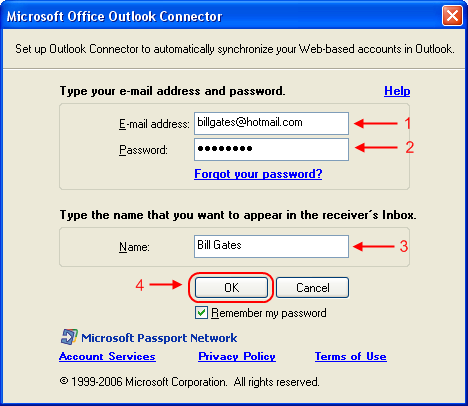
Step 5: You should be seeing the window in the screen shot above. Fill in your Hotmail/Windows Live email address and the password in the field provided. The name field is for you to specify the name you want to be displayed when you send an email. After you completed all the fields, click OK.
Account settings
Step 6: After adding the email account, you need to restart Outlook. Once you restarted your Outlook, you can start using your Hotmail account using Outlook! It will take some time for Outlook to download all your emails to your PC, so please be patience.
The other method that you can use to download your mail to Outlook is by using POP3. I will post another guide for that. But, there are some other features that you can use if you use the Outlook Connector. These features are managing your contacts and calendar using Outlook! You can’t do that if you are using POP3. The disadvantage of using the Connector plugin is that it only works with Outlook and not other email client. And it is only compatible with Outlook 2003 and above. In my opinion, if you have Outlook installed, go ahead and use the connector. If not, you can still use the POP3 method.

Thursday, 18 October 2012

Sur Kshetra | Watch Online Episodes

Link 1 
Sur Kshetra is a singing talent show or musical battle between teams of two neighbouring countries: India and Pakistan to be aired simulcast on Sahara One & Colors TV. The Indian Team is led by music director / singer, Himesh Reshammiya and the Pakistan Team is led by singer, Atif Aslam.The show, called Sur-Shetra, will air on Sahara One early next year and feature contestants from India and Pakistan. 
Pakistan and India are each other’s rivals from many years and both of the countries have also been in the competition. Whether it is cricket, whether it is Olympics or whatever Pakistan and India have been the major competitors.  Now the great battle of music is going to start between both the countries that is named as Sur Kshetra and various participants from Pakistan and India will take their part.
 
Sur Kshetra Episode 1 – Atif Aslam, Himesh Reshammiya

Link 2

PTCL 3G EVO Tab | First Pakistani Tablet PC | PTCL 3G EVO Tab Specification

PTCL has introduced first Pakistani 3G enabled smartphone Android Tablet. The PTCL 3G EVO Tab is powered by Google Android Froyo2.2 OS, EVO Tab is a 7″ capacitive multi gestures touch screen tablet packed with features of both a tablet and a GSM phone that lets you surf, talk, tweet & do a lot more simultaneously o-the-go in more than 100 cities nationwide.
PTCL’s EVO Tab also supports GSM network and you can use cellular Sim and use it as your phone to make voice calls. Evo Tab is available in two different colors i.e. Grey Stone & Ivory White.
PTCL Tablet


3G EVO Tab Black and White Color

PTCL 3G EVO Tab Specifications:

PTCL 3G EVO Tab Size & Weight:
  •     Size: 199*114*12mm
  •     Weight: 429g
PTCL 3G EVO Tab Display:
  •     7” screen
  •     WVGA LCD 800X480 resolution
  •     Capacitive touch screen
  •     Multi-Touch
PTCL 3G EVO Tab Memory:
  •     512 MB (RAM) & 512 MB (ROM)
  •     Micro Slot up to 32 GB
PTCL 3G EVO Tab Cellular & Wireless:
  •     Support EVDO/CDMA 1X 1900Mhz,
  •     GSM/GPRS/ EDGE/UMTS Quad-band: 850/900/1800/1900/ UMTS 2100Mhz
  •     Dual Mode: EVDO or UMTS
PTCL 3G EVO Tab Processor:
  •     Qualcomm MSM7627T (Turbo) 800Mhz
PTCL 3G EVO Tab Operating System:
  •     Android Froyo OS Smartphone 2.2
PTCL 3G EVO Tab Sensors:
  •     G-Sensor
  •     Light Sensor
  •     Wi-Fi
  •     Bluetooth EDR 2.1
PTCL 3G EVO Tab Camera
  •     5 Megapixel rear Auto Focus,
  •     VGA Secondary front Camera
PTCL 3G EVO Tab Input/output:
  •     USB Port
  •     Ear phone port
  •     TF card slot
  •     SD card Slots
PTCL 3G EVO Tab Battery
  •     3500 mAh internal Battery
  •     7hours usage
  •     140hours standby time
PTCL 3G EVO Tab In the Box:
  •     3G Evo Tab
  •     Stereo Earphones with Mic
  •     Micro USB Cable
  •     USB Power Adapter
  •     Free Sleeve Pouch
  •     Documentation
  •     Warranty Card
PTCL 3G EVO Tab Warranty
PTCL Evo Tab comes with 1 Year after sales & service warranty. Please refer to limited warranty statement on Warranty Card placed inside the box for complete terms & conditions.

PTCL TABLET PC : Pakistan Telecommunication Company Limited (PTCL) just launched 3G Enabled Smartphone Android Tablet

PTCL 3G EVO TAB - PAKISTAN'S FIRST 3G ENABLED ANDROID TABLET


Pakistan Telecommunication Company Limited (PTCL) just launched Pakistan’s First 3G Enabled Smartphone Android Tablet, powered by 800MHz Multicore Processors with Google Android Froyo 2.2 Operating System.


This PTCL 3G EVO Tablet has 7’’ capacitive multi gestures touch screen packed with features of both a tablet and a GSM phone that lets you surf, talk, tweet & do a lot more simultaneously on-the-go.Ptcl Evo Tab
First ever tablet
Tablet PC are new in Pakistan and this tablet from PTCL is the first product of this kind.
The features of Tablet From PTCL are:
Operating System: Android 201 Froyo
Memory: 512 mb
Internal storage; 512 MB
Connectivity: Wifi
Display: 7 Inches
Touch Screen: Yes
Touch Type: Capacitive Multi Touch
camera: 5MP rare and VGA Front end


PTCL EVO TAB REVIEW - 7" 3G ANDROID 

TABLET INTRODUCED BY PTCL

HANDS-ON REVIEW - 7" DISPLAY 3G ANDROID

 TABLET INTRODUCED BY PTCL

NEW SOFTWARE UPDATE FOR PTCL EVO TABLET


Pakistan Telecommunication Company announced new software update for their newly launched PTCL EVO TABLET. This software upgrade fix the issues which are faced by early users of the tablet. 

PTCL EVO TAB INTERNET SHARING / USB TETHERING - PTCL EVO TAB AS WIRELESS HOTSPOT / ROUTER

Tuesday, 16 October 2012

ipad Applications : iPad, Iphone Apps : Just a Little Shakespeare

Some of these apps illustrate the power of the iPad. These Shakespeare in Bits are the perfect combination of cool graphics and slick infotainment that many teachers are looking for to get their students excited about their subject. The comic feel of these apps doesn't take away from the power of the message or the human tragedy of the Shakespeare texts but what it does do, is to provide an entry point for students that are not familiar with the language or the concepts.


These are expensive but many schools would only study one Shakespeare text. It might be that the teacher buys it and uses a data projector as a warm up activity. Couple these with some of the free apps and you can create an interesting, authentic and comprehensive Shakespeare experience.


Shakespeare In Bits: Romeo & Juliet: $15.99 AU
Fall in love with Shakespeare’s timeless story of love, vengeance and tragedy - Romeo and Juliet. Featuring nearly three hours of engaging animation and unabridged text, Shakespeare In Bits Romeo and Juliet promises to engage the mind and render the hearts of all who view, read and listen to it. The ultimate study guide, this is everything you will ever need to learn, teach and appreciate Shakespeare.

http://itunes.apple.com/au/app/shakespeare-in-bits-romeo/id373763461?mt=8


Shakespeare In Bits: A Midsummer Night's Dream: $15.99 AU
This Shakespeare In Bits presentation delivers up to three hours of beautifully animated film and features the complete unabridged play text. Shakespeare In Bits A Midsummer Night’s Dream is completely unabridged. Understand and appreciate the linguistic richness of Shakespeare's A Midsummer Night's Dream with the original play text, broken into easily digested ‘bits’.

http://itunes.apple.com/au/app/shakespeare-in-bits-a-midsummer/id460928278?mt=8


Shakespeare In Bits: Macbeth: $15.99 AU
Shakespeare In Bits brings to life Macbeth in one complete multi-media experience on iPad. With two and a half hours of unabridged text, fully animated re-enactments Shakespeare in Bits Macbeth is the only study guide you will need to learn, teach and appreciate one of the finest works of the Bard. In-line translation helps to understand difficult words and phrases within the context of the original play text.

http://itunes.apple.com/au/app/shakespeare-in-bits-macbeth/id407223613?mt=8


Shakespeare In Bits: Hamlet: $14.99 AU
Immerse yourself in one of Shakespeare’s most powerful and influential tragedies as Shakespeare In Bits brings you on a journey of deception, revenge, treachery, indecision and moral decay through the fabled and tragic character of Hamlet. Shakespeare In Bits: Hamlet is the only study guide you will need to to study this powerful and tragic human tragedy.

http://itunes.apple.com/us/app/shakespeare-in-bits-hamlet/id493225251?mt=8


Shakespeare's London: $2.99 AU
Shakespeare is curiously neglected in London apart from the reconstructed Globe theatre. Shakespeare's London uses satellite positioning on your mobile phone to pinpoint buried memories, from the 3,000 seat Swan theatre on Blackfriars Bridge Road to the only house he is known to have lived in. Whether you are in London, New York or Melbourne you can walk in the master's footsteps.
Shakespeare is renowned as the English playwright and poet whose body of works is considered the greatest in English literature. All the plays from 'All's Well That Ends Well' to 'Twelfth Night' in the complete original texts with summaries. Divided into comedies, histories and tragedies. All of the Bard's 154 sonnets including the much acclaimed sonnet 18: "Shall I compare thee to a summer's day..."

http://itunes.apple.com/au/app/iwilliam-shakespeare/id383857039?mt=8


Shakespeare: FREE
Shakespeare is a free app with the complete works of Shakespeare - searchable to find the exact word or phrase you’re looking for. Even though it’s free it is packed with impressive features including customisation of colours and font, ability to jump to other scenes. Detailed scene breakdowns give you an overview of the scenes within each play, their locations, and the characters present in each.

http://itunes.apple.com/us/app/shakespeare/id285035416?mt=8


Shakespeare Pro:  $10.49 AU
Shakespeare Pro includes all the features of the free Shakespeare app; the complete works of Shakespeare (41 plays, 154 sonnets and 6 poems, including doubtful works)but it also allows you to bookmark, copy and paste and includes a integrated glossary. Shakespeare’s Words is included. Once this powerful feature is activated, simply tapping on an entry will display its definition in context.

http://itunes.apple.com/au/app/shakespeare-pro/id341392367?mt=8


Shakespeare Made Easy: $1.99 AU
Wish thou coulds't...A-hem: Wish you could make SENSE of Shakespeare? With the "Shakespeare Made Easy" Vook, now you can. Because it's a Vook, you get a great re-telling of classic texts combined with engaging video. Download now to begin decoding The Bard's great words and have a great time doing it. Get 16 of William Shakespeare's most famous plays, shortened into easy-to-read stories. 

No Fear Shakespeare: Free + In App Purchases
Don't understand Shakespeare? Get modern translations. No Fear Shakespeare puts Shakespeare’s language side by side with a modern-English translation. The app includes the first scenes of 18 plays when you download it. Includes full text of all 154 sonnets, easy to understand plot summaries and historical facts to give the play context. You need to purchase full plays for $0.99 AU from within the app.

http://itunes.apple.com/au/app/no-fear-shakespeare/id329377976?mt=8
make-money-468x60