Social Icons

Showing posts with label iOS. Show all posts

Monday, 15 October 2012

Unlock and Untethered Jailbreak of iOS 6 for iPhone 5, 4S, 4, 3GS, iPad 3, 2, 1 and iPod 4G, 3G will be Possible and Coming

iPhone-dev team soon iOS Community will get the latest Untethered Jailbreak of Apple iOS 6 and Cydia Installation on iPhone 5, iPhone 4S, iPhone 4, iPhone 3GS, The New iPad 3, iPad 2, iPad 1, iPod 4G Touch and other iOS devices. As we know Apple's latest iPhone 5 and iOS 6 is now publicly available for general public and iOS developers worldwide and every single user is seems to be waiting for iOS 6 Untethered Jailbreak and iPhone 5 Untethered Jailbreak. According to the member of iPhone-dev team named "Grant Paul aka Chpwn" who has recently tweeted about the Untethered Jailbreak process of iOS 6 on iPhone 5 and said that Taller Screens like Cydia Too in his status message which shows the image of Cydia icon installed on iPhone 5 home-screen. (You can see his tweeted image in screenshot below).


Untethered Jailbreak of iPhone 5
Before the release of iPhone 5 and with the released of Apple iOS 6 Firmware many iPhone and iOS hacker has developed and discovered some leaked security loop holes in the iOS 6 firmware and in A5X processor that allows them to easily install the Cydia on the latest devices which had provided them the Jailbreak mods and tricks to install Cydia Applications on iOS 6 running on iPhone 5 so we can also say that its now official that "Grant Paul aka Chpwn" had Unlock and Jailbreak iOS 6 on iPhone 5 and have successfully got Jailbroken iPhone 5 running iOS 6 Firmware. After the tweeter message from "Chpwn", many other iOS Jailbreak developer second the message of "Chpwn" and congrats him for his achievement and they also confirmed that iPhone 5 is Jailbroken. After the efforts from "Chpwn", another team member of iPhone-dev team named "Pod2g" who is the main developer behind the famous Absinthe Jailbreak Tool has also tweeted that they are struggling very hard to bring Jailbreak for iOS 6 on iPhone 5 and other idevices, "Pod2g" tweeted and said that "if what @p0sixninja pointed out is true, Apple failed again… Oh god.” This message clearly shows that "Joshua Hill aka p0sixninja" has found Vulnerability in iOS 6 to Jailbreak it Untethered. (You can see their tweeted images in screenshots below).

Saturday, 6 October 2012

Launch Application Shortcut in OS X


For a long time I have been trying to find a way to create a key shortcut natively in OS X to launch an application. It appears that there is a way to assign shortcuts to switch between already running applications, but nothing which allows you to assign a shortcut for a cold start of an app.

I think this is something which is very basic and Apple very much needs to hear your voice. You can leave a comment/suggestion on the official Apple OS X Feedback page.

Hopefully, aided with the help of people speaking up, we will see in the next version of OS X this very basic shortcut ability addressed.

Wednesday, 5 September 2012

iOS 5 update, a catastrophe

If you search in Google, you will find it in mostly all Mac/Apple forums, but, I do not know why, may be paying respect to Jobs, only few important pages are talking about the bad planned iOS 5 upgrade. And what worries me now is the question, is Apple ready to handle the whole traffic that iOS 5 will create with the new "Backup in the Cloud" concept and the coming new upgrades? It seems to me that they are not prepared. I could install iOS 5 in my iPad only 12 hours after the release and activate the Backup in the Cloud option only after 36 hours. And I still cannot create my first backup. The servers are so slow that took me more than 4 hours to download the 707Mb iOS file. The speed was comparable with the one we had in a old 56kb Modem.

What can I say about iOS 5?
There are few neat new features like the Tabs in Safari.


The Reader option in some pages.


The split keyboard that makes easier typing with two fingers.


But, let's be realistic. Nothing out the ordinary or innovative.

Friday, 24 August 2012

Saturday, 18 August 2012

Unlock and Untethered Jailbreak of iOS 5.1.1 and iOS 5.0.1 with Absinthe 2.0.4 & 1.2.2 for iPhone, iPad & iPod Apple iDevices

Jailbreak of iOS 5.1.1 and iOS 5.0.1 with Absinthe 2.0.4 and Absinthe 1.2.2 for iPhone 4S, iPhone 4, iPhone 3GS, iPad 3, iPad 2, iPad 1, iPod 4G Touch & iPod 3G Touch - Full Tutorial and Guidelines
Good news for Apple iOS and Apple iDevices users all around the world. The iPhone-dev team and Chronic-dev team member p0sixninja has released the new and latest version of Absinthe Tool through which iPhone, iPad and iPod users can Hack, Unlock and Jailbreak their iOS 5.1.1 and iOS 5.0.1 running devices. The new version of Absinthe Tool includes the latest update and the new version is called Greenpoison Absinthe 2.0.4 and Greenpoison Absinthe 1.2.2 to Untethered Jailbreak iOS 5.1.1 and iOS 5.0.1 for iPhone 4S, iPhone 4, iPhone 3GS, iPad 3, iPad 2, iPad 1, iPod 4G Touch & iPod 3G Touch devices. The Greenpoison Absinthe 2.0.4 and Greenpoison Absinthe 1.2.2 are now available for Windows, Mac and Linux for downloading; now users can download Absinthe 2.0.4 and Absinthe 1.2.2 and all Versions of Absinthe to Untethered Jailbreak iOS 5.0.1 and iOS 5.1.1 on all Apple iDevices.


So if you want to know What Greenpoison Absinthe 2.0.4 and Greenpoison Absinthe 1.2.2 Untethered Jailbreak can do to Hack, Unlock and Jailbreak iOS 5.1.1 and iOS 5.0.1 for iPhone 4S, iPhone 4, iPhone 3GS, iPad 3, iPad 2, iPad 1, iPod 4G Touch & iPod 3G Touch Devices and how it gives full access to your all Apple iDevices just follow the following simple steps and guidelines to Untethered Jailbreak your iOS 5.1.1 and iOS 5.0.1 running devices.

Now let’s start the Tutorial and Guidelines to Unlock and Untethered Jailbreak iOS 5.1.1 with Absinthe 2.0.4 for iPhone 4S, iPhone 4, iPhone 3GS, iPad 3, iPad 2, iPad 1, iPod 4G Touch & iPod 3G Touch.

Supportive devices for Greenpoison Absinthe 2.0.4 Untethered iOS 5.1.1 Jailbreak:
  • Apple iPhone 4S
  • Apple iPhone 4
  • Apple iPhone 4 CDMA
  • Apple iPhone 3Gs
  • Apple iPad 1
  • Apple iPad 2
  • Apple iPad 3 Wifi
  • Apple iPad 3 CDMA
  • Apple iPod 3G Touch
  • Apple iPod 4G Touch
Download Requirements for Greenpoison Absinthe 2.0.4 Untethered iOS 5.1.1 Jailbreak:
  • Download Greenpois0n Absinthe v.2.0.4 For [ Windows ]
  • Download Greenpoison Absinthe v.2.0.4 For [ Mac OS X ]
  • Download Greenpois0n Absinthe v.2.0.4 For [ Linux ]
  • Download Apple iOS 5.1.1 IPSW Firmware
How to Unlock and Jailbreak Apple iOS 5.1.1 Untethered with Greenpoison Absinthe 2.0.4?

Download the tool package provided above and then follow the following simple steps to Jailbreak and Unlock Apple iOS 5.1.1 Untethered running on iPhone 4S, iPhone 4, iPhone 3GS, iPad 3, iPad 2, iPad 1, iPod 4G Touch & iPod 3G Touch devices.

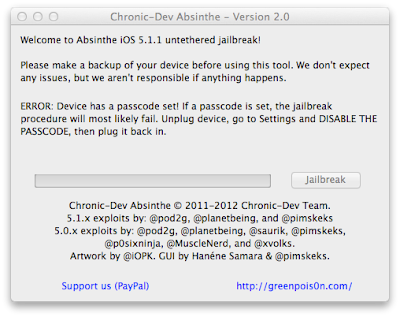
Greenpoison Absinthe 2.0.4 iOS 5.1.1 Untethered Jailbreak

Step 1: Download Absinthe v2.0.4 for Windows, Mac OS X and Linux from the above links.
Step 2: Back up are recommended so it is highly recommended that you connect your iOS device to computer and make a backup before you proceed.
Step 3: Launch Absinthe v2.0.4 which you downloaded in Step 1.
Step 4: Absinthe v2.0.4 will detect your iOS device instantly, click on the Jailbreak button once you device is detected by Absinthe.
Step 5: Absinthe will start jailbreak your iOS device untethered on iOS 5.1.1, just sit back and relax. Congratulations!! You have done it successfully and have Untethered Jailbreak iOS 5.1.1.

If everything goes well, you should now have an untethered jailbreak on your iPhone's, iPad's and iPod's devices or any other iOS devices you were jailbreaking. Remember that this Jailbreak only works with iOS 5.1.1, it won’t work with any other iOS firmware version.


Now let’s start the Tutorial and Guidelines to Unlock and Untethered Jailbreak iOS 5.0.1 with Absinthe 1.2.2 for iPhone 4S (Running iOS 5.0 or 5.0.1 [9A405 and 9A406] ) and iPad 2 (With Wifi/GSM/CDMA running iOS 5.0.1).

Supportive devices for Greenpoison Absinthe 1.2.2 Untethered iOS 5.0.1 Jailbreak:
  • Apple iPhone 4S (Running iOS 5.0 or 5.0.1 [9A405 and 9A406] )
  • Apple iPad 2 (With Wifi/GSM/CDMA running iOS 5.0.1)
Download Requirements for Greenpoison Absinthe 1.2.2 Untethered iOS 5.0.1 Jailbreak:
  • Download Greenpoison Absinthe v.0.4 For [ Windows ]
  • Download Greenpois0n Absinthe v.0.4 For [ Mac ]
  • Download Greenpoison Absinthe v.0.4 For [ Linux ]
  • Download Greenpoison Absinthe v.0.3 For [ Windows ]
  • Download Greenpoison Absinthe v.0.3 For [ Mac ]
  • Download Greenpois0n Absinthe v.0.3 For [ Linux ]
  • Download Greenpois0n Absinthe v.0.2 For [ Windows ]
  • Download Greenpoison Absinthe v.0.2 For [ Mac ]
  • Download Greenpoison Absinthe v.0.1.2.2 For [ Mac ]
  • Download Greenpoison Absinthe v.0.1.2.1 For [ Mac ]
How to Unlock and Jailbreak Apple iOS 5.0.1 Untethered with Greenpoison Absinthe 1.2.2?

Download the tool package provided above and then follow the following simple steps to Jailbreak and Unlock Apple iOS 5.0.1 Untethered running on Apple iPhone 4S and Apple iPad 2 devices.

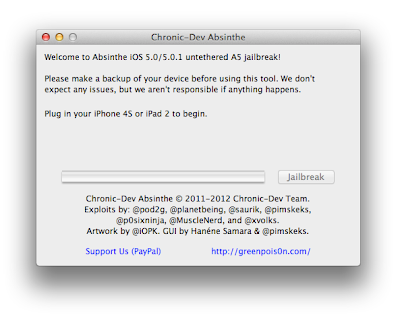
Jailbreak Apple iOS 5.0.1 Untethered with Greenpoison Absinthe 1.2.2

Step 1: Download Greenpois0n Absinthe, then unzip and run the file.
Step 2: Connect your iPhone 4S or iPad 2 with your PC via USB, and open iTunes then Restore to iOS 5.0.1.
Step 3: Connect your iPhone 4S or iPad 2 with your PC via USB.
Step 4: Simply click on "Jailbreak" button follow the steps appear on the greenpois0n screen.
Step 5: Once completed, you should see an Absinthe icon on the Home screen. Tap the Absinthe icon, it will open GreenPois0n site, and will then reboot your device. Once it loads again, the Cydia icon will have replaced the Absinthe icon. Now enjoy your iPhone 4S / iPad 2 5.0.1 untethered jailbreak. Congratulations!! You have done it successfully and have Untethered Jailbreak iOS 5.0.1.

Download Apple iOS 6, 5.1.1 Beta IPSW Firmware for iPhone, iPad & iPod - Direct Download Links

Apple has already announced the new and most advanced mobile operating system iOS 6 for iPhone, iPad, iPod, Apple TV and for other Apple iOS products today at Worldwide Developer’s Conference 2012 (WWDC). The features of Apple iOS 6 we had already discussed in our previous post. Click here if you want to know everything, anything and what iOS 6 is offering for users. The next generation of mobile operating system iOS 6 betas is now officially available for general public and for iOS developers. WWDC 2012 is already going on at WWDC 2012 with Apple's CEO Tim Cook so soon the iOS developer betas are likely to be release for general public in the next few hours or so (similar to what happened with iOS 5 released). Download and install iOS 6 beta IPSW Firmware Software Update on your iPhone 4, iPhone 4S, iPhone 3GS, iPad, iPad 2, The New iPad 3, iPod 4G/3G Touch devices, Apple TV, Safari 6 and other iOS 6 softwares for better improvement on your iDevices. (Direct Download Links of iOS 6 IPSW Firmwares are Available). Latest iOS 6 Beta 4 for iPhone, iPad, iPod and Apple TV is now officially available for download.

Apple iOS 6 for iPhone, iPad and iPod

A very well-known and authentic Chinese forum has leaked the Official Links of iOS 6 beta IPSW Firmware Software Update for all iDevices including iPhone 4, iPhone 4S, iPhone 3GS, iPad, iPad 2, The New iPad 3, iPod 4G/3G Touch devices, Apple TV, Safari 6 and other iOS 6 softwares. These iOS 6 leaked links have already spread on internet because after the few hours it will automatically get active for general public and iOS developers and iOS users will be able to download iOS 6 beta IPSW Firmware Software Update files directly from Apple servers. According to sources Apple iOS Developers will have access to the first beta on iOS 6 later this afternoon and iOS customers can expect to see iOS 6 Software Updates directly from Apple iDevices through OTA (Over-the-Air) Wirelessly in Fall of this year or users can also download and install iOS 6 from their PC desktop via iTunes. The whole iOS 6 IPSW Firmware setup files are divided into two separate versions, one is Consumer Version and other is Enterprise Version. iOS Developers can start using and developing iOS 6 from today with the first iOS 6 beta. If you are not an iOS Developer so don’t worry you can still download and install iOS 6 in your Apple iDevices. First get full backup of your recent iOS software version with iTunes, but keep in mind that beta software always has bugs and compatibility issues.

External Download Links of Apple iOS 6 beta IPSW Firmware:

Currently only external unofficial download links are activated and available for iOS 6 beta IPSW Firmwares. iOS users and developers can download iOS 6 setup files from the following external unofficial activated and working mirrors and links, soon you will get official links working and activated on this page. Following download links are also iOS 6 IPSW Firmware setups files leaked directly from Apple's servers in working condition. We have got the following links from here. Apple iOS 6 Beta 1, Beta 2 & Beta 3 has expired and no more working for iOS users and developers, you need to download Latest iOS 6 Beta 4 Firmware for iDevices so please Download and Install Latest Apple iOS 6 Beta 4 IPSW Firmware from this Link.
  • Apple iOS 6 beta for iPhone 4S (Size: 875.89 MB)
  • Apple iOS 6 beta for iPhone 4 CDMA (Size: 846.17 MB)
  • Apple iOS 6 beta for iPhone 4 GSM (Size: 849.44 MB)
  • Apple iOS 6 beta for iPhone 3GS (Size: 761.40 MB)
  • Apple iOS 6 beta for iPod Touch 4G (Size: 807.67 MB)
  • Apple iOS 6 beta for iPad 3 WiFi + Celluar (Size: 1.07 GB)
  • Apple iOS 6 beta for iPad 3 WiFi (Size: 1.04 GB)
  • Apple iOS 6 beta for iPad 2 CDMA (Size: 783.31 MB)
  • Apple iOS 6 beta for iPad 2 GSM (Size: 785.61 MB)
  • Apple iOS 6 beta for iPad 2 WiFi (Size: 769.44 MB)
  • Apple iOS 6 beta for Apple TV 3 (Size: 586.92 MB)
  • Apple iOS 6 beta for Apple TV 2 (Size: 542.22 MB)
Torrent Download Links of Apple iOS 6 beta IPSW Firmware:

Apple iOS users and developers can also download iOS 6 beta IPSW Firmware setups files directly from Torrents server. Following iOS 6 beta Torrents Links are activated and in fully working condition. Get your iOS 6 beta torrent files now. We have got the following links from here. Apple iOS 6 Beta 1, Beta 2 & Beta 3 has expired and no more working for iOS users and developers, you need to download Latest iOS 6 Beta 4 Firmware for iDevices so please Download and Install Latest Apple iOS 6 Beta 4 IPSW Firmware from this Link.
  • Apple iOS 6 beta for iPhone 4S (Size: 875.89 MB) - Torrent Link
  • Apple iOS 6 beta for iPhone 4 CDMA (Size: 846.17 MB) - Torrent Link
  • Apple iOS 6 beta for iPhone 4 GSM (Size: 849.44 MB) - Torrent Link
  • Apple iOS 6 beta for iPhone 3GS (Size: 761.40 MB) - Torrent Link
  • Apple iOS 6 beta for iPod Touch 4G (Size: 807.67 MB) - Torrent Link
  • Apple iOS 6 beta for iPad 3 WiFi + Celluar (AT&T) (Size: 1.07 GB) - Torrent Link
  • Apple iOS 6 beta for iPad 3 WiFi + Cellular (Verizon) (Size: 1.07 GB) - Torrent Link
  • Apple iOS 6 beta for iPad 3 WiFi (Size: 1.04 GB) - Torrent Link
  • Apple iOS 6 beta for iPad 2 Rev A (Size: 769.16 MB) - Torrent Link
  • Apple iOS 6 beta for iPad 2 CDMA (Size: 783.31 MB) - Torrent Link
  • Apple iOS 6 beta for iPad 2 GSM (Size: 785.61 MB) - Torrent Link
  • Apple iOS 6 beta for iPad 2 WiFi (Size: 769.44 MB) - Torrent Link
  • Apple iOS 6 beta for Apple TV 3 (Size: 586.92 MB) - Torrent Link
  • Apple iOS 6 beta for Apple TV 2 (Size: 542.22 MB) - Torrent Link
Official Direct Download Links of Apple iOS 6 IPSW Firmware:

Apple iOS Users and iOS Developers can download iOS 6 beta setups files from the following official mirrors and links directly from Apple's server. Apple iOS 6 Beta 1, Beta 2 & Beta 3 has expired and no more working for iOS users and developers, you need to download Latest iOS 6 Beta 4 Firmware for iDevices so please Download and Install Latest Apple iOS 6 Beta 4 IPSW Firmware from this Link.
make-money-468x60