Social Icons

Showing posts with label iPod. Show all posts

Friday, 5 October 2012

How to Enable Magic Mouse Free-Scrolling in Leopard


You might have noticed the ability to scroll through web pages with the trackpad on the Magic Mouse in a way that is similar to the iPhone, iPod Touch and iPad.

It seems that Apple has only made this feature visible in System Preferences in Snow Leopard, but they have not added it to the interface on Leopard.

You can enable this kind of scrolling manually by typing some basic commands.

Simply start Terminal, and type the following (without quotation marks):

"defaults write com.apple.driver.AppleBluetoothMultitouch.mouse MouseMomentumScroll -bool yes"

After doing this, you might have to check and uncheck the Scroll option in System Preferences, and now you should have free scrolling fully enabled.

Friday, 28 September 2012

Downgrade from iOS 6 beta Firmware to iOS 5.1.1 for iPhone 4S/4, 3GS, iPad 3/2, iPad, iPod 4G & 3G.

Apple iOS 6 beta Firmware many iOS device users upgrades their iOS Firmware version from old iOS Firmware iOS 5.1.1 to the new iOS 6 beta Firmware and many of them are happy using iOS 6 beta Firmware on their iPhone 4S, iPhone 4, iPhone 3GS, iPad 1, iPad 2, The New iPad 3, iPod 3G Touch, iPod 4G Touch, Apple TV 3/2 and for all A4 and A5 chipset iOS Devices but some iOS users are facing some problem with iOS 6 beta Firmware, it’s because beta software's and firmware's always has bugs and compatibility issues with devices. So if you're one of them and not satisfy with your Apple device performance of iPhone 4S, iPhone 4, iPhone 3GS, iPad 1, iPad 2, The New iPad 3, iPod 3G Touch, iPod 4G Touch and Apple TV 3/2 after upgrading from old iOS firmware to the latest iOS 6 beta firmware and wants to switch back and Downgrade your Apple device Software and Firmware from latest iOS 6 beta to old iOS 5.1.1 Firmware of iPhone 4S, iPhone 4, iPhone 3GS, iPad 1, iPad 2, The New iPad 3, iPod 3G Touch, iPod 4G Touch, Apple TV 3/2 and for all A4 and A5 chipset iOS Devices than you can do this by yourself with easy steps and procedure.


Downgrade iOS 6 to iOS 5.1.1

If you have updated and upgraded your Apple iPhone, iPad, iPod to check out the new features in iOS 6 beta or updated your idevice mistakenly, it’s surely breaks your Untethered Jailbreak of your iDevice and it won't let you install it again in new iOS 6 beta. So in this tutorial we will show you How to Downgrade from iOS 6 beta Firmware/Software to iOS 5.1.1 Firmware/Software for iPhone 4S, iPhone 4, iPhone 3GS, iPad 1, iPad 2, The New iPad 3, iPod 3G Touch, iPod 4G Touch and Apple TV 3/2 devices. Now let’s start the Tutorial and Guidelines to Downgrade your Apple device Firmware/Software from latest iOS 6 beta to iOS 5.1.1 Firmware of iPhone 4S, iPhone 4, iPhone 3GS, iPad 1, iPad 2, The New iPad 3, iPod 3G Touch, iPod 4G Touch, Apple TV 3/2 and for all A4 and A5 chipset iOS Devices.
Supportive devices for Apple iOS 6 beta Firmware Downgrading:
  • Apple iPhone 4S
  • Apple iPhone 4
  • Apple iPhone 3GS
  • Apple iPad 3
  • Apple iPad 2
  • Apple iPad
  • Apple iPod 4G Touch
  • Apple iPod 3G Touch
  • Apple TV 3
  • Apple TV2
Download Requirements for Apple iOS 6 beta Firmware Downgrading:
How to Downgrade iOS Firmware from iOS 6 Beta to iOS 5.1.1 for iPhone, iPad, iPod and Apple TV?
Download the tool package provided above and then follow the following simple steps to Downgrade iOS Firmware from iOS 6 Beta to iOS 5.1.1 for iPhone 4S, iPhone 4, iPhone 3GS, iPad 1, iPad 2, The New iPad 3, iPod 3G Touch, iPod 4G Touch, Apple TV 3/2 and for all A4 and A5 chipset iOS Devices.

Step 1: Download iOS 5.1.1 IPSW Firmware for your iDevice from above mentioned link.

Step 2: Connect your iDevice with PC via USB, and launch iTunes.

Step 3: Put you iDevice in DFU mode:
  • Press and hold the Home button and the Power button at the same time. 
  • After exactly 10 seconds release the Power button. Continue holding the home button until you iTunes pops up a message telling you that it has detected an iPhone in recovery mode.
Step 4: Select your iDevice from iTunes sidebar, then hold down (Shift for Window) Or (Alt for Mac) and click on the ‘Restore’ button, then point it to iOS 5.1.1 ipsw file. Wait for between 10 and 15 minutes. Congratulations!! You have now successfully Downgraded iOS 6 beta Firmware to iOS 5.1.1 Firmware on your iDevice.

Sunday, 16 September 2012

Apple iPod Nano 7G and iPod Touch 5G Specifications, Review, and Details

Apple on its main iPhone 5 event held on 12th September, 2012 has announced its next generation iPod Media Players devices with some hardware and software upgrades and named its 5th Generation iPod Touch and 7th Generation iPod Nano with some advanced features and specs. Apple has introduced a revamp version of iPod Media Players with big screens and redesigned models with colorful outfit. The Apple iPod Nano gets the biggest change as compare to its previous small and square model with a video support and a taller version with a 2.5 inch video screen. The all new iPod Nano is almost 40 percent thinner than the its previous sixth generation iPod Nano. It is even much thinner as compare to iPhone 5 and has only 5.4mm thickness. It can not only play music and video (in widescreen) but it also has an FM tuner, Bluetooth wireless and more, the amazing thing is that it even got a small home button. iPod Nano comes in eight colorful models. Apple iPod Nano has play, pause and even the volume controllers on the sides of the iPod Nano device. Users can even browse the photos and videos on 7th Generation of iPod Nano and it also has the smaller dock same as that of iPhone 5, it has also get the ability of Multi-touch and tasking. Apple iPod Nano will be shipped with the all new Apple "EarPods" (the most advanced audio media device with ease of comfort and streaming).


On the other side, Apple iPod Touch is the 5th Generation iPod device having the same display screen size of 4.0 inch Retina Display like in iPhone 5 which makes better gaming experience and watching movies but it’s just 6.1 mm thick, making it the thinnest version of the iPod Touch of its kind. iPod Touch has a faster A5 processor and can access 175,000 iOS apps. It also supports 5 megapixel camera with support for 1080ps video, along with Bluetooth 4.0 support. The iPod Touch will also come in various different colors and outfits. iPod Touch has improved Battery life, just like the new iPhone has 8 hours of Video playback time. The 5th Generation of iPod Touch will also integrated with most advanced mobile operating system iOS 6 pre-installed to take full advantage of the hardware it has to offer and it has also get Siri feature, the virtual assistant which we all love and have fun talking to like in iPhone 4S and iPhone 5. Apple iPod Touch will be shipped with the all new Apple "EarPods" (the most advanced audio media device with ease of comfort and streaming). There is good news for Apple iPod Shuffle users that iPod Shuffle will also get new colors and outfits to match those available for the new iPod Nanos and iPod Touch devices but there will be no other hardware and software changes at all.

Apple 7th Gen. iPod Nano Pictures and Screenshots:


Apple 5th Gen. iPod Touch Pictures and Screenshots:


Apple 7th Gen. iPod Nano Price and Availability:

The all new Apple iPod Nano 7th Gen. will be publicly available worldwide in October, 2012 with the price tag of just $149 with the storage capacity of 16GB. The price tag of old version of iPod Shuffle with brand new colors and outfits will be cost just $49 with the storage capacity of 2GB.

Apple 5th Gen. iPod Touch Price and Availability:

The all new Apple iPod Touch 5th Gen. will be publicly available worldwide in October, 2012 with the price tag of just $299 with the storage capacity of 32GB and the price tag of just $399 with the storage capacity of 64GB and the older version of iPod Touch will still be sold with the 16GB storage selling for $199 and the 32GB storage for $249 only.

Price Comparison Between iPod Touch, iPod Nano and iPod Shuffle Media Player devices:

Monday, 3 September 2012

How to Export iPhone Contacts using this Free BETA App

Link

I recently discovered a tool which helped me export iPhone contacts. Some of the features of this iPhone manager program that draw attention at first sight include:

export iphone contacts
  • Sync and export iPhone contacts to PC
  • Copy iPhone contacts
  • Group iPhone contacts
  • Edit iPhone contacts and add new contact entries to your iPhone

This is all done from the PC and iPhone contact changes are done in real-time. The program is useful, as you can manage iPhone contacts directly via your PC keyboard and computer screen.

Here is what CopyTrans Contacts can be used for:

Export iPhone contacts

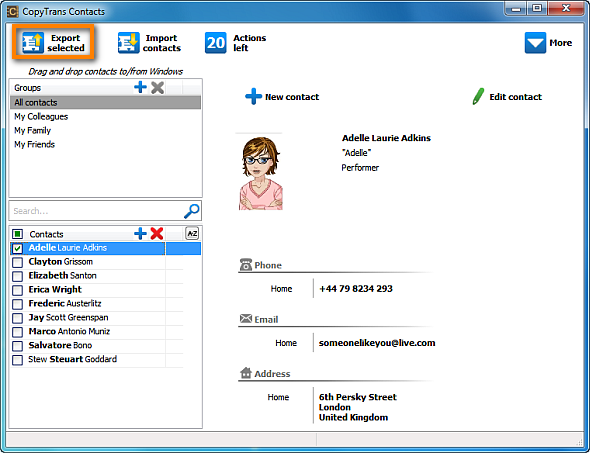
1. Run the program by double-clicking on its icon from your Desktop

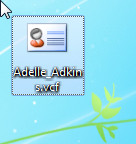
2. Select which of your iPhone contacts to export and hit the "Export contacts" button". Here I have chosen to export a single iPhone contact but you can choose to export all iPhone contacts at once.

iphone contacts export

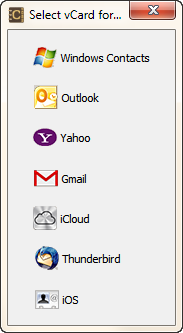
3. A small new window will prompt you in what file format you wish the iPhone contacts exported. I have chosen to export it in Windows Contacts format.

iphone export contacts

You will see the new contact entry appear wherever you wanted it exported to. In my case, I simply exported the contact to my Windows desktop

iphone contacts

Among other functions, I found the following useful as well:

Edit iPhone contacts

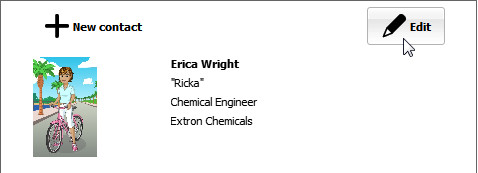
Simply select any iPhone contact from the Contacts pane and hit the "Edit button". You are then able to change/add/remove any of your contact details such as name, address, telephone number, etc.

manage iphone contacts

Group iPhone contacts

This is a feature of special importance as iPhone's default Contacts app can in theory show iPhone groups, but does not let you create or edit iPhone contact groups.

iphone manage contacts

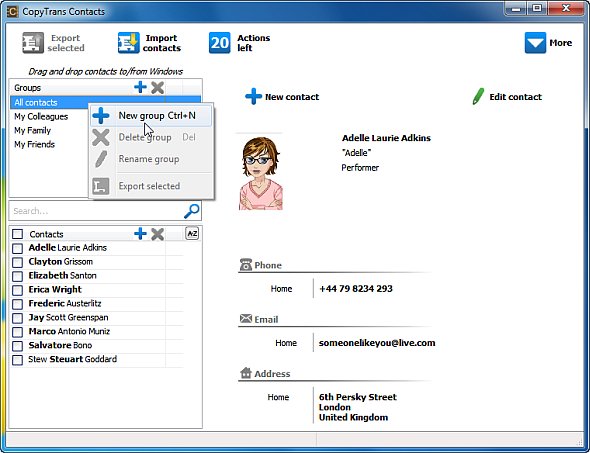
CopyTrans Contacts makes it especially easy to create new contact groups and add iPhone contacts to groups. Simply right-click within the Group pane and select "New group". Then drag-drop any of your iPhone contacts to the contact group you wish.

System requirements for the program:

Windows 7, Vista, XP

Your iPhone

Wednesday, 22 August 2012

Google Chrome Browser for iPhone, iPad and iPod iOS Devices Features, Details and information

Google Chrome Web Browser user of Desktop PC version than you must know the features, specification, performance and unlimited useful extensions of it, now good news for Apple iOS devices users that new Google Chrome Web Browser for iPhone, iPad and iPod has been released for iOS Smartphones and Tablets and i recommended iOS device users to try it once because it will boost up your Web Browsing experience on Mobile Platform. As of now Apple Safari Web Browser is the default and built-in Web Browser for iPhone, iPad and iPod iOS devices and iOS device users didn't have anyother option till yet but now iOS device users have got the Best Web Browser option for their Mobile Platform which is Google Chrome Web Browser for Apple iPhone, iPad and iPod devices with unlimited useful extensions available for iOS Mobile Platform.


Google Chrome Web Browser was launched in year 2008 with the aim to overtake other Web Browsers and it got successful, Google Chrome have already overtook Internet Explorer by Microsoft and Mozilla Firefox web browsers and became the most popular web browser in the world after that its enjoying the top position and positive status from their users. Google’s only and most downloaded Web Browser along with the Google's Drive (a cloud storage service) is available on the App Store for easy download by the users. Google's Chrome browser is also available in the app store since Thursday, 28th June 2012. Google Chrome for iPhone, iPad and iPod is seems to be a great browser just like Android and Desktop PC versions. The great part is that the browser is available for the Apple iOS Devices that has iOS 4.3 or even higher.

Saturday, 18 August 2012

Unlock and Untethered Jailbreak of iOS 5.1.1 and iOS 5.0.1 with Absinthe 2.0.4 & 1.2.2 for iPhone, iPad & iPod Apple iDevices

Jailbreak of iOS 5.1.1 and iOS 5.0.1 with Absinthe 2.0.4 and Absinthe 1.2.2 for iPhone 4S, iPhone 4, iPhone 3GS, iPad 3, iPad 2, iPad 1, iPod 4G Touch & iPod 3G Touch - Full Tutorial and Guidelines
Good news for Apple iOS and Apple iDevices users all around the world. The iPhone-dev team and Chronic-dev team member p0sixninja has released the new and latest version of Absinthe Tool through which iPhone, iPad and iPod users can Hack, Unlock and Jailbreak their iOS 5.1.1 and iOS 5.0.1 running devices. The new version of Absinthe Tool includes the latest update and the new version is called Greenpoison Absinthe 2.0.4 and Greenpoison Absinthe 1.2.2 to Untethered Jailbreak iOS 5.1.1 and iOS 5.0.1 for iPhone 4S, iPhone 4, iPhone 3GS, iPad 3, iPad 2, iPad 1, iPod 4G Touch & iPod 3G Touch devices. The Greenpoison Absinthe 2.0.4 and Greenpoison Absinthe 1.2.2 are now available for Windows, Mac and Linux for downloading; now users can download Absinthe 2.0.4 and Absinthe 1.2.2 and all Versions of Absinthe to Untethered Jailbreak iOS 5.0.1 and iOS 5.1.1 on all Apple iDevices.


So if you want to know What Greenpoison Absinthe 2.0.4 and Greenpoison Absinthe 1.2.2 Untethered Jailbreak can do to Hack, Unlock and Jailbreak iOS 5.1.1 and iOS 5.0.1 for iPhone 4S, iPhone 4, iPhone 3GS, iPad 3, iPad 2, iPad 1, iPod 4G Touch & iPod 3G Touch Devices and how it gives full access to your all Apple iDevices just follow the following simple steps and guidelines to Untethered Jailbreak your iOS 5.1.1 and iOS 5.0.1 running devices.

Now let’s start the Tutorial and Guidelines to Unlock and Untethered Jailbreak iOS 5.1.1 with Absinthe 2.0.4 for iPhone 4S, iPhone 4, iPhone 3GS, iPad 3, iPad 2, iPad 1, iPod 4G Touch & iPod 3G Touch.

Supportive devices for Greenpoison Absinthe 2.0.4 Untethered iOS 5.1.1 Jailbreak:
  • Apple iPhone 4S
  • Apple iPhone 4
  • Apple iPhone 4 CDMA
  • Apple iPhone 3Gs
  • Apple iPad 1
  • Apple iPad 2
  • Apple iPad 3 Wifi
  • Apple iPad 3 CDMA
  • Apple iPod 3G Touch
  • Apple iPod 4G Touch
Download Requirements for Greenpoison Absinthe 2.0.4 Untethered iOS 5.1.1 Jailbreak:
  • Download Greenpois0n Absinthe v.2.0.4 For [ Windows ]
  • Download Greenpoison Absinthe v.2.0.4 For [ Mac OS X ]
  • Download Greenpois0n Absinthe v.2.0.4 For [ Linux ]
  • Download Apple iOS 5.1.1 IPSW Firmware
How to Unlock and Jailbreak Apple iOS 5.1.1 Untethered with Greenpoison Absinthe 2.0.4?

Download the tool package provided above and then follow the following simple steps to Jailbreak and Unlock Apple iOS 5.1.1 Untethered running on iPhone 4S, iPhone 4, iPhone 3GS, iPad 3, iPad 2, iPad 1, iPod 4G Touch & iPod 3G Touch devices.

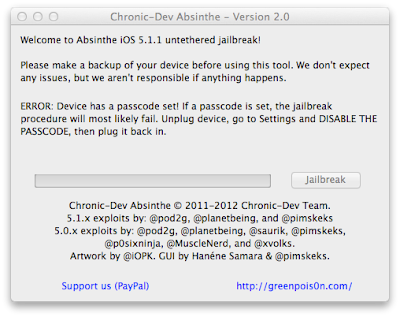
Greenpoison Absinthe 2.0.4 iOS 5.1.1 Untethered Jailbreak

Step 1: Download Absinthe v2.0.4 for Windows, Mac OS X and Linux from the above links.
Step 2: Back up are recommended so it is highly recommended that you connect your iOS device to computer and make a backup before you proceed.
Step 3: Launch Absinthe v2.0.4 which you downloaded in Step 1.
Step 4: Absinthe v2.0.4 will detect your iOS device instantly, click on the Jailbreak button once you device is detected by Absinthe.
Step 5: Absinthe will start jailbreak your iOS device untethered on iOS 5.1.1, just sit back and relax. Congratulations!! You have done it successfully and have Untethered Jailbreak iOS 5.1.1.

If everything goes well, you should now have an untethered jailbreak on your iPhone's, iPad's and iPod's devices or any other iOS devices you were jailbreaking. Remember that this Jailbreak only works with iOS 5.1.1, it won’t work with any other iOS firmware version.


Now let’s start the Tutorial and Guidelines to Unlock and Untethered Jailbreak iOS 5.0.1 with Absinthe 1.2.2 for iPhone 4S (Running iOS 5.0 or 5.0.1 [9A405 and 9A406] ) and iPad 2 (With Wifi/GSM/CDMA running iOS 5.0.1).

Supportive devices for Greenpoison Absinthe 1.2.2 Untethered iOS 5.0.1 Jailbreak:
  • Apple iPhone 4S (Running iOS 5.0 or 5.0.1 [9A405 and 9A406] )
  • Apple iPad 2 (With Wifi/GSM/CDMA running iOS 5.0.1)
Download Requirements for Greenpoison Absinthe 1.2.2 Untethered iOS 5.0.1 Jailbreak:
  • Download Greenpoison Absinthe v.0.4 For [ Windows ]
  • Download Greenpois0n Absinthe v.0.4 For [ Mac ]
  • Download Greenpoison Absinthe v.0.4 For [ Linux ]
  • Download Greenpoison Absinthe v.0.3 For [ Windows ]
  • Download Greenpoison Absinthe v.0.3 For [ Mac ]
  • Download Greenpois0n Absinthe v.0.3 For [ Linux ]
  • Download Greenpois0n Absinthe v.0.2 For [ Windows ]
  • Download Greenpoison Absinthe v.0.2 For [ Mac ]
  • Download Greenpoison Absinthe v.0.1.2.2 For [ Mac ]
  • Download Greenpoison Absinthe v.0.1.2.1 For [ Mac ]
How to Unlock and Jailbreak Apple iOS 5.0.1 Untethered with Greenpoison Absinthe 1.2.2?

Download the tool package provided above and then follow the following simple steps to Jailbreak and Unlock Apple iOS 5.0.1 Untethered running on Apple iPhone 4S and Apple iPad 2 devices.

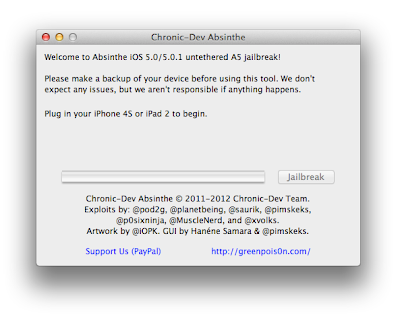
Jailbreak Apple iOS 5.0.1 Untethered with Greenpoison Absinthe 1.2.2

Step 1: Download Greenpois0n Absinthe, then unzip and run the file.
Step 2: Connect your iPhone 4S or iPad 2 with your PC via USB, and open iTunes then Restore to iOS 5.0.1.
Step 3: Connect your iPhone 4S or iPad 2 with your PC via USB.
Step 4: Simply click on "Jailbreak" button follow the steps appear on the greenpois0n screen.
Step 5: Once completed, you should see an Absinthe icon on the Home screen. Tap the Absinthe icon, it will open GreenPois0n site, and will then reboot your device. Once it loads again, the Cydia icon will have replaced the Absinthe icon. Now enjoy your iPhone 4S / iPad 2 5.0.1 untethered jailbreak. Congratulations!! You have done it successfully and have Untethered Jailbreak iOS 5.0.1.

Download Apple iOS 6, 5.1.1 Beta IPSW Firmware for iPhone, iPad & iPod - Direct Download Links

Apple has already announced the new and most advanced mobile operating system iOS 6 for iPhone, iPad, iPod, Apple TV and for other Apple iOS products today at Worldwide Developer’s Conference 2012 (WWDC). The features of Apple iOS 6 we had already discussed in our previous post. Click here if you want to know everything, anything and what iOS 6 is offering for users. The next generation of mobile operating system iOS 6 betas is now officially available for general public and for iOS developers. WWDC 2012 is already going on at WWDC 2012 with Apple's CEO Tim Cook so soon the iOS developer betas are likely to be release for general public in the next few hours or so (similar to what happened with iOS 5 released). Download and install iOS 6 beta IPSW Firmware Software Update on your iPhone 4, iPhone 4S, iPhone 3GS, iPad, iPad 2, The New iPad 3, iPod 4G/3G Touch devices, Apple TV, Safari 6 and other iOS 6 softwares for better improvement on your iDevices. (Direct Download Links of iOS 6 IPSW Firmwares are Available). Latest iOS 6 Beta 4 for iPhone, iPad, iPod and Apple TV is now officially available for download.

Apple iOS 6 for iPhone, iPad and iPod

A very well-known and authentic Chinese forum has leaked the Official Links of iOS 6 beta IPSW Firmware Software Update for all iDevices including iPhone 4, iPhone 4S, iPhone 3GS, iPad, iPad 2, The New iPad 3, iPod 4G/3G Touch devices, Apple TV, Safari 6 and other iOS 6 softwares. These iOS 6 leaked links have already spread on internet because after the few hours it will automatically get active for general public and iOS developers and iOS users will be able to download iOS 6 beta IPSW Firmware Software Update files directly from Apple servers. According to sources Apple iOS Developers will have access to the first beta on iOS 6 later this afternoon and iOS customers can expect to see iOS 6 Software Updates directly from Apple iDevices through OTA (Over-the-Air) Wirelessly in Fall of this year or users can also download and install iOS 6 from their PC desktop via iTunes. The whole iOS 6 IPSW Firmware setup files are divided into two separate versions, one is Consumer Version and other is Enterprise Version. iOS Developers can start using and developing iOS 6 from today with the first iOS 6 beta. If you are not an iOS Developer so don’t worry you can still download and install iOS 6 in your Apple iDevices. First get full backup of your recent iOS software version with iTunes, but keep in mind that beta software always has bugs and compatibility issues.

External Download Links of Apple iOS 6 beta IPSW Firmware:

Currently only external unofficial download links are activated and available for iOS 6 beta IPSW Firmwares. iOS users and developers can download iOS 6 setup files from the following external unofficial activated and working mirrors and links, soon you will get official links working and activated on this page. Following download links are also iOS 6 IPSW Firmware setups files leaked directly from Apple's servers in working condition. We have got the following links from here. Apple iOS 6 Beta 1, Beta 2 & Beta 3 has expired and no more working for iOS users and developers, you need to download Latest iOS 6 Beta 4 Firmware for iDevices so please Download and Install Latest Apple iOS 6 Beta 4 IPSW Firmware from this Link.
  • Apple iOS 6 beta for iPhone 4S (Size: 875.89 MB)
  • Apple iOS 6 beta for iPhone 4 CDMA (Size: 846.17 MB)
  • Apple iOS 6 beta for iPhone 4 GSM (Size: 849.44 MB)
  • Apple iOS 6 beta for iPhone 3GS (Size: 761.40 MB)
  • Apple iOS 6 beta for iPod Touch 4G (Size: 807.67 MB)
  • Apple iOS 6 beta for iPad 3 WiFi + Celluar (Size: 1.07 GB)
  • Apple iOS 6 beta for iPad 3 WiFi (Size: 1.04 GB)
  • Apple iOS 6 beta for iPad 2 CDMA (Size: 783.31 MB)
  • Apple iOS 6 beta for iPad 2 GSM (Size: 785.61 MB)
  • Apple iOS 6 beta for iPad 2 WiFi (Size: 769.44 MB)
  • Apple iOS 6 beta for Apple TV 3 (Size: 586.92 MB)
  • Apple iOS 6 beta for Apple TV 2 (Size: 542.22 MB)
Torrent Download Links of Apple iOS 6 beta IPSW Firmware:

Apple iOS users and developers can also download iOS 6 beta IPSW Firmware setups files directly from Torrents server. Following iOS 6 beta Torrents Links are activated and in fully working condition. Get your iOS 6 beta torrent files now. We have got the following links from here. Apple iOS 6 Beta 1, Beta 2 & Beta 3 has expired and no more working for iOS users and developers, you need to download Latest iOS 6 Beta 4 Firmware for iDevices so please Download and Install Latest Apple iOS 6 Beta 4 IPSW Firmware from this Link.
  • Apple iOS 6 beta for iPhone 4S (Size: 875.89 MB) - Torrent Link
  • Apple iOS 6 beta for iPhone 4 CDMA (Size: 846.17 MB) - Torrent Link
  • Apple iOS 6 beta for iPhone 4 GSM (Size: 849.44 MB) - Torrent Link
  • Apple iOS 6 beta for iPhone 3GS (Size: 761.40 MB) - Torrent Link
  • Apple iOS 6 beta for iPod Touch 4G (Size: 807.67 MB) - Torrent Link
  • Apple iOS 6 beta for iPad 3 WiFi + Celluar (AT&T) (Size: 1.07 GB) - Torrent Link
  • Apple iOS 6 beta for iPad 3 WiFi + Cellular (Verizon) (Size: 1.07 GB) - Torrent Link
  • Apple iOS 6 beta for iPad 3 WiFi (Size: 1.04 GB) - Torrent Link
  • Apple iOS 6 beta for iPad 2 Rev A (Size: 769.16 MB) - Torrent Link
  • Apple iOS 6 beta for iPad 2 CDMA (Size: 783.31 MB) - Torrent Link
  • Apple iOS 6 beta for iPad 2 GSM (Size: 785.61 MB) - Torrent Link
  • Apple iOS 6 beta for iPad 2 WiFi (Size: 769.44 MB) - Torrent Link
  • Apple iOS 6 beta for Apple TV 3 (Size: 586.92 MB) - Torrent Link
  • Apple iOS 6 beta for Apple TV 2 (Size: 542.22 MB) - Torrent Link
Official Direct Download Links of Apple iOS 6 IPSW Firmware:

Apple iOS Users and iOS Developers can download iOS 6 beta setups files from the following official mirrors and links directly from Apple's server. Apple iOS 6 Beta 1, Beta 2 & Beta 3 has expired and no more working for iOS users and developers, you need to download Latest iOS 6 Beta 4 Firmware for iDevices so please Download and Install Latest Apple iOS 6 Beta 4 IPSW Firmware from this Link.
make-money-468x60