


As you install a new browser on your computer like Internet Explorer,Firefox or chrome after completing the installation there a option appear on your screen to making your browser as a default browser.
If you are working with Internet Explorer as a default browser now u want to make Firefox or Chrome as a default browser just follow the step how to make your browser default.
Make your Firefox as a default browser:
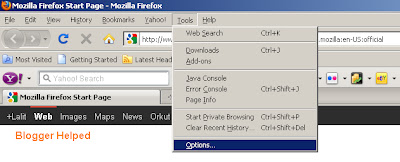
1. Double click on your Firefox after opening your Firfox just see at the top of your browser a link Tool than Click onOptions.
Or
Use these key to open the options quick Alt+T+O As you press these keys at a time the Options window will appear on your screen.see below.
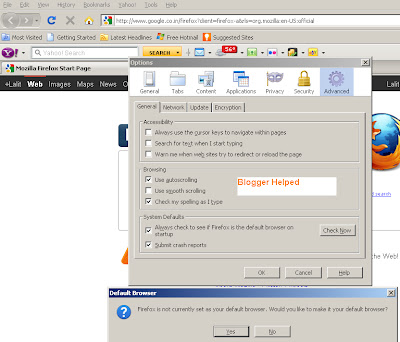
2. Click on the Advanced tab under this tab you will find another button named Check Now click on it a separate window will open which will ask for making your browser as a default browser Click on yes see picture below.
You have Done.
Make your Internet Explorer as a default browser:
Initially with your operating system Internet Explorer Installed as a default browser Unfortunately if it is not as a default just see how to make your IE Default.
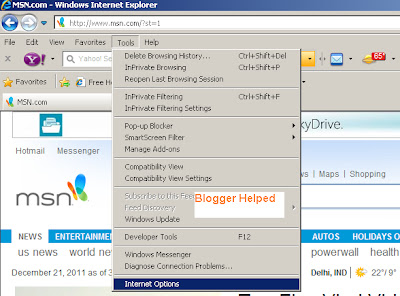
1. Double click on your IE after opening your IE just see at the top of your browser a link Tool than Click on Options.
Or
Use these key to open the options quick Alt+T+O As you press these keys at a time the Options window will appear on your screen.see below.
Tick the checkbox for "Check if Opera is default browser on startup" see picture below.
Next time you start Opera, answer "Yes" when the dialog asks you if you want Opera to be the default browser on your computer.
You have done.
Make your Chrome as a default browser:
1. Click on the Chrome "wrench" icon, placed at the top right hand side of your browser window. click on it than the drop-down menu appears, select the Options see picture below.
2. Click on the Basics tab if it is not already selected. At the bottom of the dialog is the Default browser section To change that setting, click on the button labeled Make Google Chrome my default browser see picture below.
You have done.
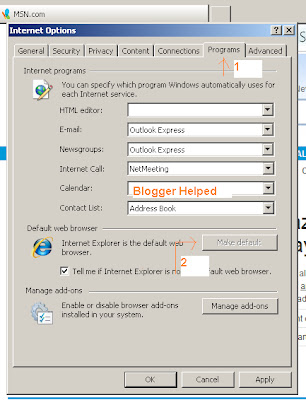
2. Click on the Programs tab under this tab you will find another button named Make Default click on it see picture below.
You have done
Make your Opera as a default browser:
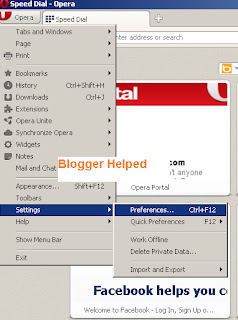
Open your Opera see at the top left side Opera button Just click over the button than follow the bellow step.
Open your Opera see at the top left side Opera button Just click over the button than follow the bellow step.
1. Go to
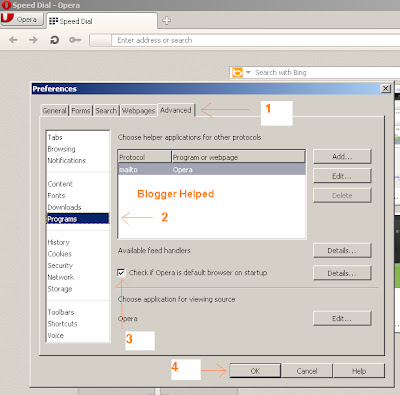
Tick the checkbox for "Check if Opera is default browser on startup" see picture below.
Next time you start Opera, answer "Yes" when the dialog asks you if you want Opera to be the default browser on your computer.
You have done.
Make your Chrome as a default browser:
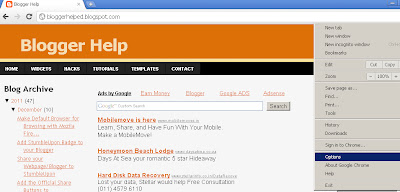
1. Click on the Chrome "wrench" icon, placed at the top right hand side of your browser window. click on it than the drop-down menu appears, select the Options see picture below.
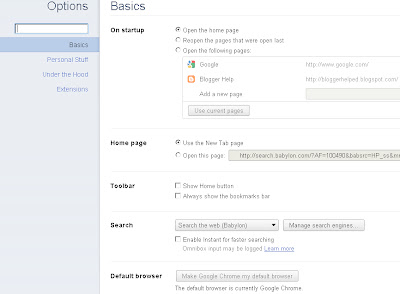
2. Click on the Basics tab if it is not already selected. At the bottom of the dialog is the Default browser section To change that setting, click on the button labeled Make Google Chrome my default browser see picture below.
You have done.


