how to improve search engine optimization (SEO) of your Blogger blog (Blogspot blog) by optimizing your post title tags for search engines like Google and Yahoo. How to improve search engine results by optimizing post title tags.
By default your Blogger blog (Blogspot blog) does not have search engine optimised title tags. This puts your blog at a disadvantage compared to other blogs that have inbuilt SEO or enhanced SEO modules as these sites are likely to be placed more highly in search engine results.
The
title tags of your blog are ordered by blog name first followed by the title of the post. This is not ideal for popular search engines like Google and Yahoo which give more importance to the first words of a title. By way of example take a look at how the title tags of this blog were viewed in a browser before any SEO. Note the order of the tags: Blog Name | Post Name.
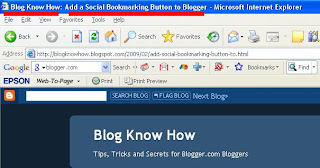
When this site was first indexed by Google this is the search engine results this site received. Note how the blog name is first in all the results.

Fortunately there is a simple tweak to your template which can rectify this problem. By simply reversing the position of the blog name and page title significant improvement can be gained in search engine results. See the difference in the example below:
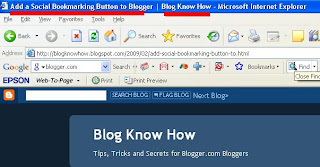
Follow the step by step guide below to achieve higher rankings in search engine results.
Tweak of Title Tags for New Blogger (beta) Blogs1. Login to your blog at Blogger.com and navigate to
Design > Edit HTML2.
Backup your template by downloading it to your computer. This will ensure that you can upload your template before these changes in case of problems.
3.
Replace the following line of code (about 5-10 lines from the top):
<data:blog.pageTitle/>
with (highlight code,
Ctrl + C to copy)
<data:blog.pageName/> |<br /><data:blog.title/>

<data:blog.pageTitle/>
4. Click on
Save Template and then
View Blog. Navigate to an individual post. You will see that your page title is now first followed by your blog title. A pipe symbol separates the two.
Below is an example of the change in search engine results since the tweak was implemented for this site. Since optimising for search engine friendly page titles there has been a significant improvement in traffic accessing the site. This didn't happen right away but if you too implement this page title tweak and continue to deliver quality content you are on your way toward higher search engine rankings.
 Troubleshooting
Several readers have reported issues with the line:
If you experience problems try inserting this line instead which works on many blogs. Ensure you have double quote marks around item followed by a single quote mark:
For more on this please read the comments section.
UPDATEDue to the number of readers experiencing problems with their browsers reading this post I have created a PDF file of this article which is free to
downloadThis Blogger tutorial (Blogspot tutorial) has discussed how to adapt the title tags of a Blogger (Blogspot) blog to improve search engine optimization (SEO) by Google,Yahoo and other search engines.


